
tortoise-orm (1.1.2)
Installation
pip install --index-url About this package
Easy async ORM for python, built with relations in mind
============ Tortoise ORM
.. image:: https://img.shields.io/pypi/v/tortoise-orm.svg?style=flat :target: https://pypi.python.org/pypi/tortoise-orm .. image:: https://pepy.tech/badge/tortoise-orm/month :target: https://pepy.tech/project/tortoise-orm .. image:: https://github.com/tortoise/tortoise-orm/workflows/gh-pages/badge.svg :target: https://github.com/tortoise/tortoise-orm/actions?query=workflow:gh-pages .. image:: https://github.com/tortoise/tortoise-orm/actions/workflows/ci.yml/badge.svg?branch=develop :target: https://github.com/tortoise/tortoise-orm/actions?query=workflow:ci .. image:: https://coveralls.io/repos/github/tortoise/tortoise-orm/badge.svg :target: https://coveralls.io/github/tortoise/tortoise-orm




Introduction
Tortoise ORM is an easy-to-use asyncio ORM (Object Relational Mapper) inspired by Django.
You can find the docs at Documentation <https://tortoise.github.io>_
Tortoise ORM supports CPython 3.10 and later for SQLite, MySQL, PostgreSQL, Microsoft SQL Server, and Oracle.
Why was Tortoise ORM built?
Tortoise ORM was built to provide a lightweight, async-native Object-Relational Mapper for Python with a familiar Django-like API.
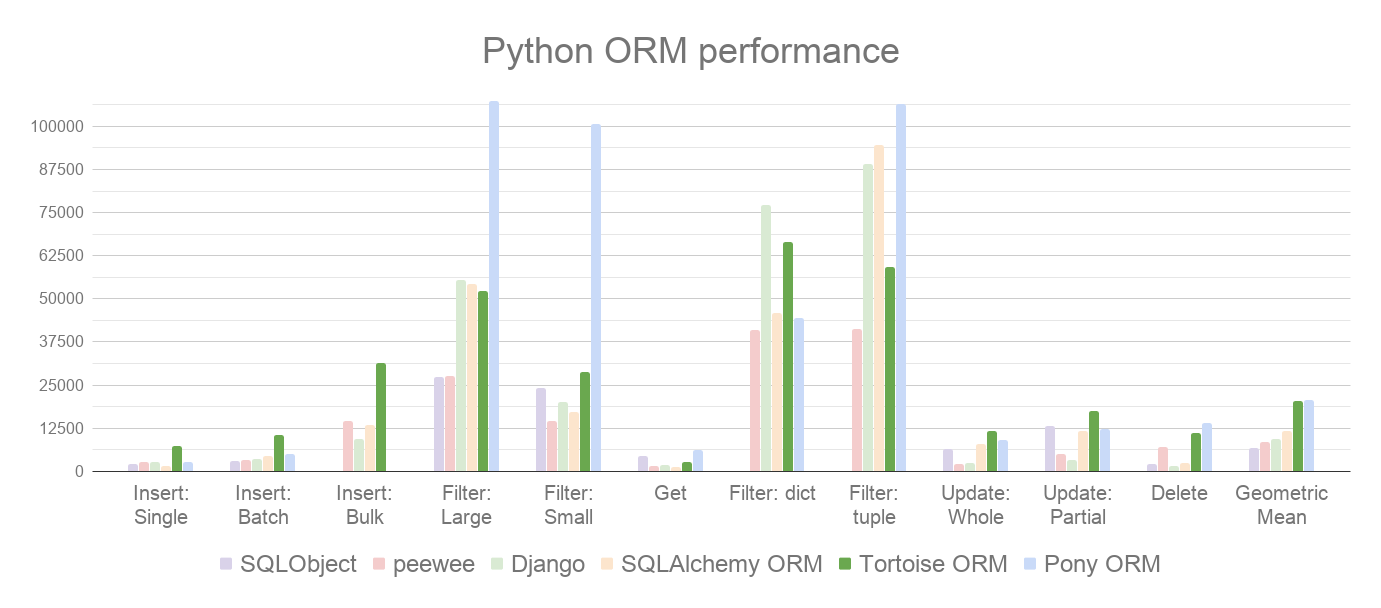
Tortoise ORM performs well when compared to other Python ORMs. Here are our benchmarks <https://github.com/tortoise/orm-benchmarks>_ on PostgreSQL 17, where we measure different read and write operations (rows/sec, more is better):
.. image:: https://raw.githubusercontent.com/tortoise/tortoise-orm/develop/docs/ORM_Perf.png :target: https://github.com/tortoise/orm-benchmarks
How is an ORM useful?
An Object-Relational Mapper (ORM) abstracts database interactions, allowing developers to work with databases using high-level, object-oriented code instead of raw SQL.
- Reduces boilerplate SQL, allowing faster development with cleaner, more readable code.
- Helps prevent SQL injection by using parameterized queries.
- Centralized schema and relationship definitions make code easier to manage and modify.
- Handles schema changes through version-controlled migrations.
Getting Started
Installation
The following table shows the available installation options for different databases (note that there are multiple options of clients for some databases):
.. list-table:: Available Installation Options :header-rows: 1 :widths: 30 70
-
- Database
- Installation Command
-
- SQLite
pip install tortoise-orm
-
- PostgreSQL (psycopg)
pip install tortoise-orm[psycopg]
-
- PostgreSQL (asyncpg)
pip install tortoise-orm[asyncpg]
-
- MySQL (aiomysql)
pip install tortoise-orm[aiomysql]
-
- MySQL (asyncmy)
pip install tortoise-orm[asyncmy]
-
- MS SQL
pip install tortoise-orm[asyncodbc]
-
- Oracle
pip install tortoise-orm[asyncodbc]
Quick Tutorial
Define the models by inheriting from tortoise.models.Model.
.. code-block:: python3
from tortoise.models import Model
from tortoise import fields

class Tournament(Model):
    id = fields.IntField(primary_key=True)
    name = fields.CharField(max_length=20)


class Event(Model):
    id = fields.BigIntField(primary_key=True)
    name = fields.TextField()
    tournament = fields.ForeignKeyField('models.Tournament', related_name='events', on_delete=fields.OnDelete.CASCADE)
    participants = fields.ManyToManyField('models.Team', related_name='events', through='event_team', on_delete=fields.OnDelete.SET_NULL)


class Team(Model):
    id = fields.UUIDField(primary_key=True)
    name = fields.CharField(max_length=20, unique=True)
After defining the models, Tortoise ORM needs to be initialized to establish the relationships between models and connect to the database.
The code below creates a connection to a SQLite DB database with the aiosqlite client. generate_schema sets up schema on an empty database.
generate_schema is for development purposes only; use the built-in
migrations for production use.
.. code-block:: python3
from tortoise import Tortoise, run_async

async def init():
    # Here we connect to a SQLite DB file.
    # also specify the app name of "models"
    # which contain models from "app.models"
    await Tortoise.init(
        db_url='sqlite://db.sqlite3',
        modules={'models': ['app.models']}
    )
    # Generate the schema
    await Tortoise.generate_schemas()

run_async(main())
run_async is a helper function to run simple Tortoise scripts. Check out Documentation <https://tortoise.github.io>_ for FastAPI, Sanic and other integrations.
With the Tortoise initialized, the models are available for use:
.. code-block:: python3
async def main():
    await Tortoise.init(
        db_url='sqlite://db.sqlite3',
        modules={'models': ['app.models']}
    )
    await Tortoise.generate_schemas()

    # Creating an instance with .save()
    tournament = Tournament(name='New Tournament')
    await tournament.save()

    # Or with .create()
    await Event.create(name='Without participants', tournament=tournament)
    event = await Event.create(name='Test', tournament=tournament)
    participants = []
    for i in range(2):
        team = await Team.create(name='Team {}'.format(i + 1))
        participants.append(team)

    # One to Many (ForeignKey) relations support creating related objects
    another_event = await tournament.events.create(name='Another Event')

    # Many to Many Relationship management is quite straightforward
    # (there are .remove(...) and .clear() too)
    await event.participants.add(*participants)

    # Iterate over related entities with the async context manager
    async for team in event.participants:
        print(team.name)

    # The related entities are cached and can be iterated in the synchronous way afterwards
    for team in event.participants:
        pass

    # Use prefetch_related to fetch related objects
    selected_events = await Event.filter(
        participants=participants[0].id
    ).prefetch_related('participants', 'tournament')
    for event in selected_events:
        print(event.tournament.name)
        print([t.name for t in event.participants])

    # Prefetch multiple levels of related entities
    await Team.all().prefetch_related('events__tournament')

    # Filter and order by related models too
    await Tournament.filter(
        events__name__in=['Test', 'Prod']
    ).order_by('-events__participants__name').distinct()

run_async(main())
Learn more at the documentation site <https://tortoise.github.io>_
Migrations
Tortoise ORM ships with a built-in migration framework and CLI. Autodetect model changes, generate migration files, and apply them:
.. code-block:: shell
tortoise init                # create migration packages
tortoise makemigrations      # detect changes and generate migrations
tortoise migrate             # apply pending migrations
tortoise sqlmigrate app 001  # preview SQL without executing
Migrations support RunPython and RunSQL for data migrations, offline migration generation,
reversible operations, and multi-app and multi db-schema projects.
See the migrations documentation <https://tortoise.github.io/migration.html>_ for
full setup and examples.
Contributing
Please have a look at the Contribution Guide <docs/CONTRIBUTING.rst>_.
License
This project is licensed under the Apache License - see the LICENSE.txt <LICENSE.txt>_ file for details.